A Wi-Fi dead zone in the upstairs office, a doorbell camera that drops offline, and a tangle of power adapters behind the TV are not separate problems. They are often signs that the home was never planned for connected technology. Smart home structured wiring creates the physical backbone for the systems homeowners now rely on every day, from reliable internet and security to whole-home audio, lighting controls, EV charging, and backup power.
For homeowners in Northern Virginia, this work is especially valuable during a renovation, addition, panel upgrade, or move into an older property. Walls are open, decisions are being made, and it is far less expensive to run the right pathways now than to cut into finished drywall later. The goal is not to fill a house with gadgets. It is to build a clean, code-conscious electrical and low-voltage infrastructure that can adapt as your needs change.
What Smart Home Structured Wiring Actually Includes
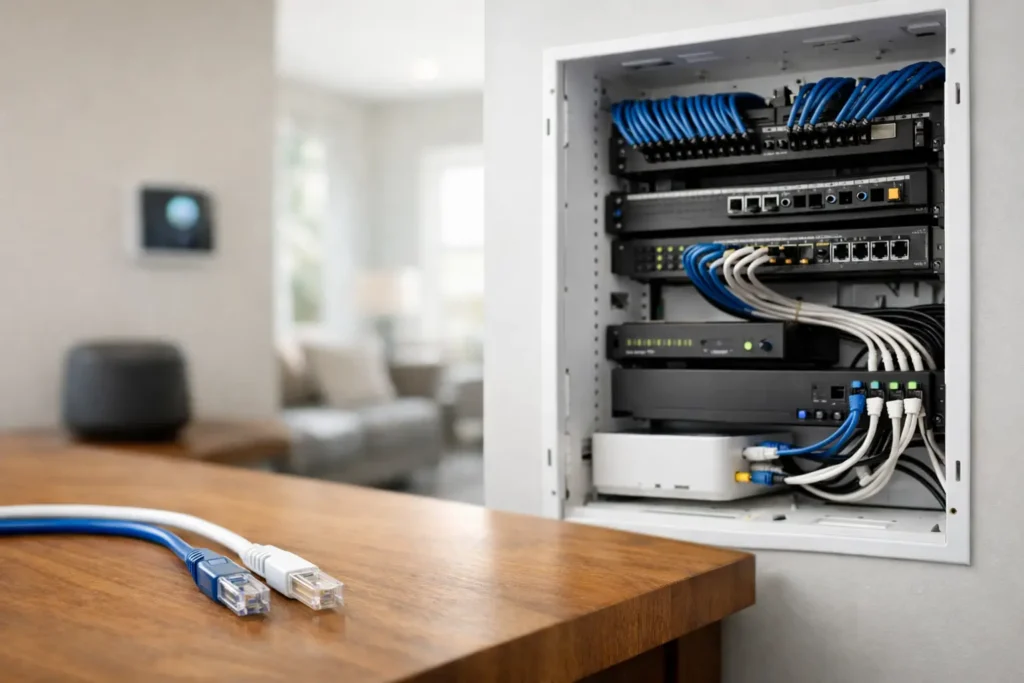
Structured wiring is an organized system of cables, conduits, enclosures, and dedicated pathways that connect a home’s technology systems to a central location. That location is usually a structured media panel, network rack, or utility-area enclosure where internet service, networking equipment, security components, and control hardware can be installed and serviced neatly.
It is different from the 120V and 240V branch circuits that power outlets, appliances, air conditioners, and Level 2 EV chargers. A well-planned project considers both systems together. Low-voltage cabling supports communication and controls, while electrical infrastructure supplies safe, adequate power wherever that technology will live.
The exact cable plan depends on the house and the homeowner’s priorities. Common components include Cat6 or Cat6A Ethernet cable for wired network connections, coaxial cable where television or antenna distribution still makes sense, speaker wire for audio zones, and low-voltage cabling for cameras, access controls, sensors, shades, and control keypads. Conduit is often just as valuable as the cable itself. An empty, accessible pathway gives future installers a way to add or replace cable without opening walls.
Why Wi-Fi Alone Is Not a Long-Term Plan
Modern Wi-Fi is powerful, but it should not be asked to carry every critical connection in a house. Wireless performance changes with wall materials, floor layouts, nearby networks, device count, and the distance from the access point. In a large home in McLean, Great Falls, or Ashburn, a single router placed in a utility closet rarely produces dependable coverage everywhere it matters.
Wired Ethernet gives stationary, high-demand devices a direct connection. That can include office computers, televisions, gaming systems, wireless access points, network video recorders, and cameras. It also allows Power over Ethernet, or PoE, to provide both data and low-voltage power through one cable to compatible cameras, access points, intercoms, and other devices. Fewer plug-in transformers means a cleaner installation and fewer points of failure.
This does not mean every device needs a hardwired connection. Phones, tablets, smart speakers, and many sensors are designed for wireless operation. The practical approach is to hardwire the fixed equipment that benefits most from speed, reliability, and central management, then use professionally placed access points for strong wireless coverage throughout the home.
Plan the Wiring Around How You Live
A good structured wiring design starts with rooms and routines, not a generic package. A home office may need two or more Ethernet drops, dedicated receptacles, and a pathway for future equipment. A media room may need connections behind the display, at an equipment cabinet, and in the ceiling for access points or speakers. A detached garage may need data connectivity for cameras, a network access point, and an EV charging setup.
Think beyond the current furniture layout. If a bedroom could become an office, run cable accordingly. If you may add a television to a covered patio, account for weather-appropriate equipment, power, and data. If security cameras are a priority, identify coverage areas before landscaping, siding, and exterior finishes limit cable routes.
For larger homes, it can be worthwhile to plan multiple network access point locations, one or more camera locations at each exterior elevation, and a central equipment location with enough room for expansion. The equipment should remain accessible, dry, ventilated, and away from areas where it can be easily damaged. A cramped closet with no power, no cooling, and no cable management becomes frustrating quickly.
Choose a Central Location Carefully
The structured wiring panel or rack is the home’s technology center. It should have dedicated power, appropriate surge protection, clear labeling, and enough physical space for a modem, router, network switch, PoE switch, battery backup, and future equipment. It should also be located where service providers can reasonably bring their connection into the home.
Avoid placing this equipment in an attic, behind finished cabinetry, or inside a small coat closet without ventilation. Network electronics generate heat and occasionally need resets, upgrades, or service. An accessible utility room, conditioned basement area, or purpose-built low-voltage closet is usually a better choice.
Future-Proofing Means Leaving Options Open
No one can predict exactly which smart-home platform, security camera, or energy technology will be popular five years from now. Future-proofing is not about guessing the next device. It is about preserving choices.
Cat6A may be a sensible choice for longer runs or homes where higher network capacity is a priority. Conduit to key locations can make later upgrades practical. Extra cable loops, unused ports, and a larger enclosure can prevent a modest project from becoming a costly retrofit. Labeling every cable at both ends saves time for every technician who works on the system after installation.
Electrical planning belongs in this conversation as well. A homeowner adding smart lighting, motorized shades, an induction range, a heat pump, solar, battery backup, or a 240V EV charger may need more than a few extra receptacles. Service capacity, panel space, load calculations, and dedicated circuits should be evaluated before equipment is selected. In many older Northern Virginia homes, a 200A or larger panel upgrade provides the capacity needed to support electrification and connected-home improvements without overloading an outdated system.
Security, Reliability, and Power Protection
Connected homes create more reliance on network equipment. If the modem, router, switch, and access points lose power, cameras and smart controls may lose their connection even when the rest of the house is functioning normally. A small battery backup can keep critical network equipment operating during short outages. For longer outages, a generator or whole-home battery system can be designed to support selected circuits or broader household loads.
Surge protection also deserves attention. Whole-home surge protection at the electrical panel helps protect sensitive electronics from voltage events that enter through the electrical service. Point-of-use protection may still be appropriate for select equipment, but it should not be the only line of defense.
Security also involves the physical installation. Camera cables should be concealed where possible, exterior penetrations should be sealed correctly, and low-voltage wiring should be separated from power conductors according to applicable code and manufacturer requirements. A clean installation is not cosmetic alone. It improves serviceability and reduces the chance of damaged or improperly routed cabling.
When to Install Structured Wiring
The best time is before walls are closed. During a kitchen renovation, basement finish, addition, or whole-home rewire, technicians can run cable efficiently through open framing. The incremental cost of additional drops or conduit during this stage is often small compared with retrofitting later.
Existing finished homes can still benefit. Experienced electricians and smart-home specialists can often use basements, attics, crawlspaces, closets, and exterior routes to reach high-value locations with minimal disruption. The scope may be more selective, focusing on offices, media areas, access point locations, cameras, and the central network location. It depends on the home’s construction and the level of finish protection required.
Permits are not always required for every low-voltage installation, but related electrical work often is. If the project includes new circuits, panel changes, dedicated equipment power, transfer switches, or EV charging infrastructure, permit and inspection requirements must be handled correctly. Master electrician oversight helps ensure the power side of the project is designed for safety, capacity, and code compliance rather than treated as an afterthought.
A Practical Starting Point for Homeowners
Before requesting a design, identify the frustrations you want to solve: unreliable Wi-Fi, poor camera coverage, a cluttered media setup, a new home office, planned EV charging, or concern about outages. Then consider upcoming projects over the next three to five years. A wiring plan that accounts for a future addition, solar installation, or backup power system is usually more valuable than one designed only around this month’s devices.
Voltex Electric approaches these projects as part of the home’s larger electrical modernization plan. That means evaluating panel capacity, circuit needs, equipment locations, cable pathways, and the expansion options that matter to the homeowner, while keeping the installation clean and manageable from the first quote through inspection.
The right smart home structured wiring system should disappear into the house once the work is done. What remains is dependable connectivity, equipment that is easy to service, and a home that is ready for the technology you choose next.